Own-project case study
The Office: presenting a 3D website alongside a clear service offer
By Vikas Bharat Yadav · Published by VikasBuilds · Published
The Office is a VikasBuilds website project, presented as a 3D office that visitors can explore. It also appears as a code product in the VikasBuilds store. This project note covers how the project is presented on this site while keeping app development, website development and publishing easy to find. It is not a client testimonial or a claim about sales results.
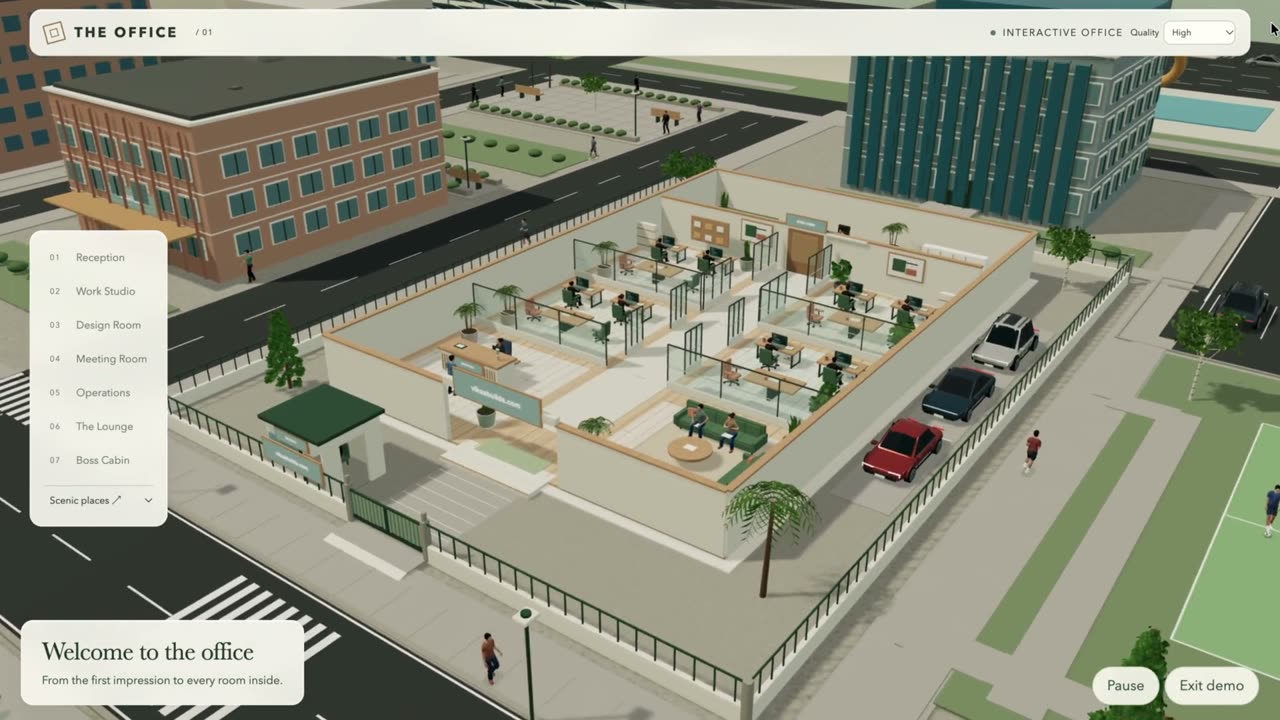
Show the experience before asking someone to buy
The store presents The Office with a preview image and a video that has visible playback controls. A visitor can watch the demonstration before deciding whether the code product fits their needs. The video starts with preload set to none, so it is not requested as a full video simply because the store page opens.
The preview is evidence of the visual experience, not a substitute for describing what the buyer receives. The product page separately explains the code download, setup guide and usage terms.
Keep the service journey separate from the demo
A visitor who wants a business website should not need to understand the 3D project before finding the enquiry form. The VikasBuilds homepage therefore leads with app development, website development and publishing links. The Office remains a secondary demonstration of VikasBuilds work.
The website-development page shows the project as an example of custom work and links to the demo. Its scope receives its own quote. The ₹4,999 development starting price does not describe the price of recreating a project like this.
- Explain the service before presenting optional demonstrations
- Link the example to the relevant service
- Keep the next enquiry step visible and understandable
Use a still frame for the first mobile visit
The homepage uses an image from the project as its first visual. On phone-sized screens, the background video sources stay inactive until the visitor selects Play. The same loading policy considers reduced-motion and data-saving preferences, and pauses background motion when the page is hidden.
AVIF poster images have WebP fallbacks. The image is requested eagerly because it is part of the first view; the optional video is not needed to read the headline or use the service links. This describes the current VikasBuilds presentation, not a promise that every device will load it at the same speed.
Verify the presentation as well as the visual effect
For the current site, local phone checks confirmed that the initial background video sources were inactive and the page had no horizontal overflow. The service pages were checked on mobile and desktop, including their route to an enquiry. These checks help protect the practical path through the site.
Performance still needs measurement. Recent mobile lab results have varied, and the mobile performance target remains open in the implementation plan. We do not treat a smaller image file or one favourable score as proof of better rankings, more sales or a finished performance audit.
- Read the headline and follow service links without playing video
- Check image fallbacks and the Play control
- Review mobile layout and loading separately
- Keep measured limits visible in the project record
Choose between buying code and commissioning a website
The Office code product is for someone who can run and adapt the supplied website, or has a developer to help. Custom design, hosting, a domain and putting the code online are not included in that product’s listed deliverables. Review the current store details and terms before purchasing.
If you need a website planned around your own business, use the development enquiry instead. We can scope content, pages, integrations and testing before agreeing on a quote. A project demonstration helps show a direction; your requirements determine the actual build.